A 0.8B OCR model beat our production pipeline on 827 scanned medical letters
I process scanned medical letters for a living — dense print, tables, faxes, photocopies of photocopies. OCR quality is the floor everything else in the pipeline stands on: classification, extraction, routing. So when a 0.8B model became the first end-to-end model to top OmniDocBench, five days after release I had it running against my production pipeline OCR on 827 real scanned letters, with a frontier model as referee.
The short version: the small end-to-end model won on accuracy, won big on worst-case accuracy, and after some tuning it was parsing 590 pages a minute on a single RTX 5090. Pipeline OCR needs a very good reason now.
Pipeline vs end-to-end, in one paragraph#
Traditional document OCR is a pipeline: a layout detector finds regions on the page, each region gets cropped and OCR’d separately, and the results get reassembled in reading order. It works — most of the OmniDocBench leaderboard has been pipeline systems for a long time. But it has a structural weakness: if the layout detector misses a region, that text is silently gone. No error, no low-confidence flag. Gone. An end-to-end model consumes the whole page image and generates the whole transcript in one pass — there is no layout stage to fail. It also means one model, one serving stack, no glue config.
The contenders#
| System | Type | Size | Role in this test |
|---|---|---|---|
| OvisOCR2 | End-to-end VLM | 0.8B | The challenger |
| GLM-OCR | Pipeline (layout → crop → OCR) | 0.9B | The incumbent (my production deployment) |
| Gemini 3.5 Flash | Frontier VLM | — | Reference transcriptions (pseudo-ground-truth) |
OvisOCR2 is post-trained from Qwen3.5-0.8B with a multi-stage recipe — SFT, then RL on a 4B branch with a multi-component reward, then on-policy distillation back into the 0.8B model (technical report). Apache 2.0, runs on stock vLLM. One prompt per page image in, complete markdown out — HTML tables, LaTeX formulas, reading order handled.
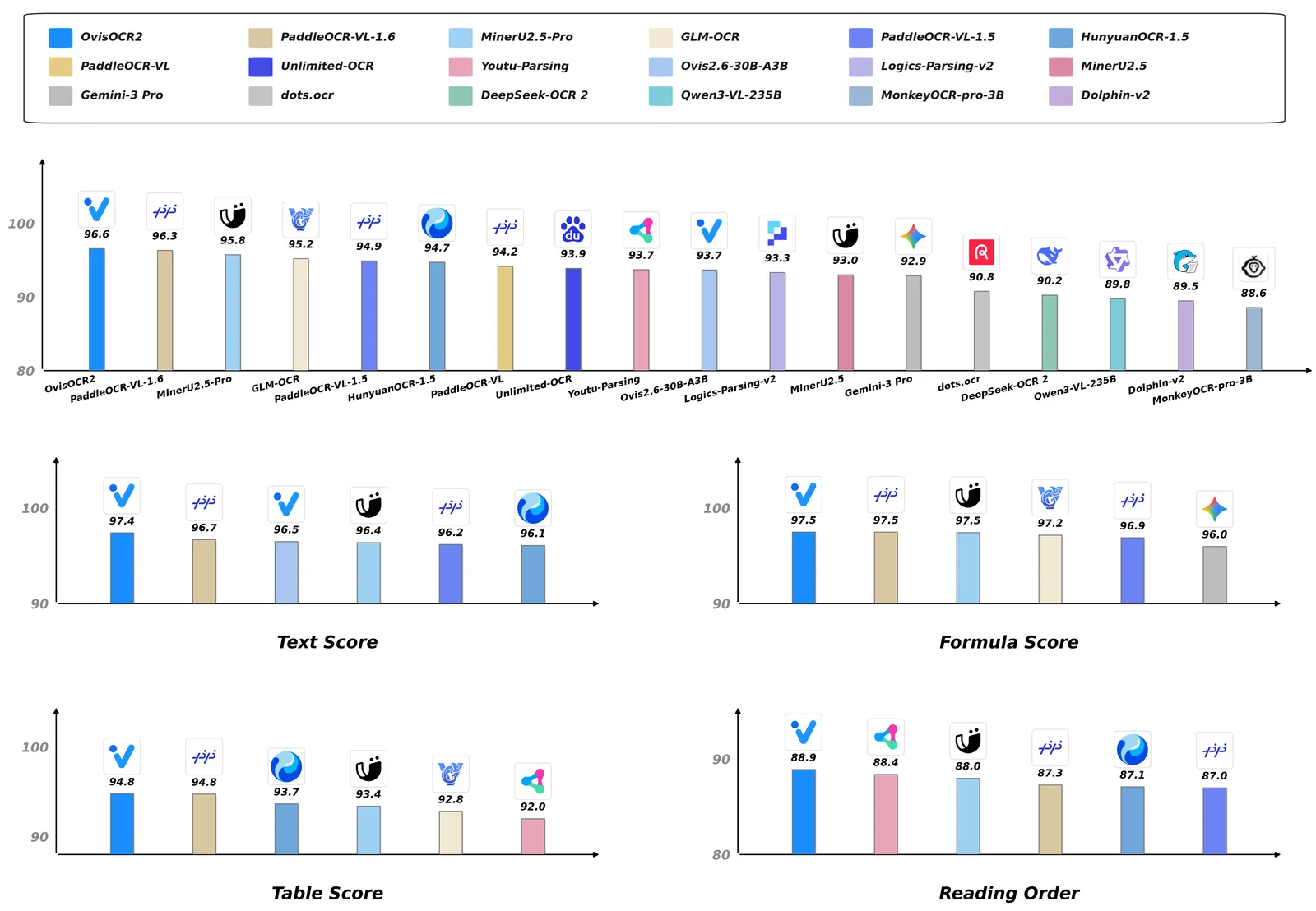
On the public leaderboard it isn’t just competitive — it’s on top, above every pipeline system and every frontier general VLM:
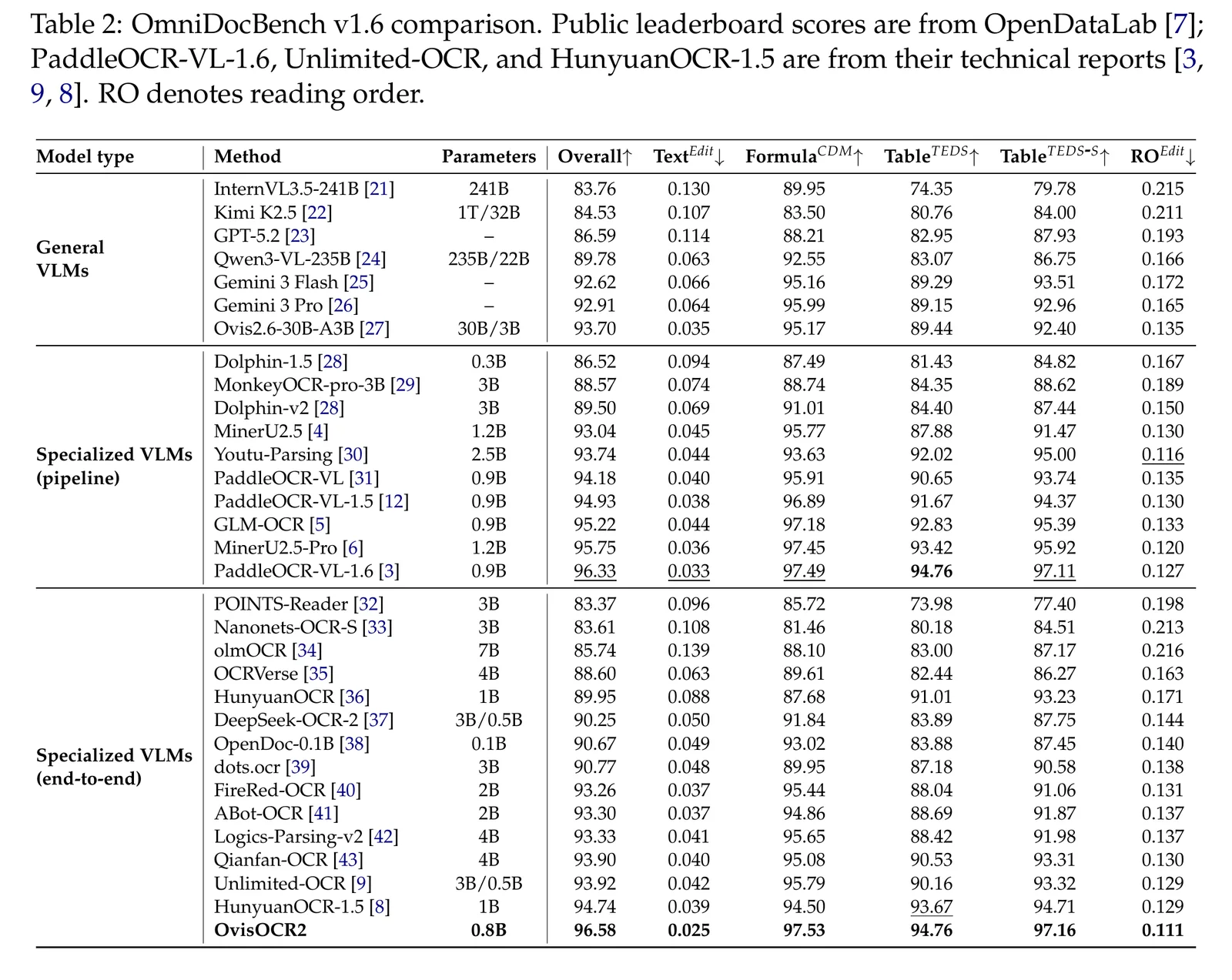
The detailed comparison table from the technical report is worth a look too — OvisOCR2 has the best text edit distance (0.025) of any model on the board, general VLMs included:
Leaderboards are leaderboards, though. My documents don’t look like benchmark documents. So: my own test.
The test: 827 real scanned letters#
The corpus is 827 real-world scanned clinical letters — the full spectrum from clean laser-printed referrals to fax artifacts and skewed photocopies. (It’s patient data, so everything ran locally and no document content appears in this post — aggregate numbers only.)
Methodology: I transcribed every document with Gemini 3.5 Flash and used those transcriptions as pseudo-ground-truth, then scored both engines against them with word-level F1. About 780 documents ended up with usable references. This measures agreement with a frontier model, not absolute truth — but disagreement patterns are exactly where the interesting failures live.
Accuracy results#
| Metric | GLM-OCR (pipeline) | OvisOCR2 |
|---|---|---|
| Mean word-F1 | 0.908 | 0.947 |
| Median word-F1 | 0.942 | 0.971 |
| 10th percentile F1 (the tail) | 0.810 | 0.898 |
| Head-to-head (win / loss / tie) | 41 wins | 503 wins (236 ties) |
Mean word-F1 vs Gemini 3.5 Flash references — and remember, agreeing 94.7% with the referee means being nearly indistinguishable from a frontier model, at 0.8B parameters, on-prem.
The tail is the real story. OvisOCR2’s 10th percentile is roughly the pipeline’s median. When I read through the documents where GLM-OCR lost badly, it was the same failure over and over: the layout detector missed a region on a dense, HTML-print-style page, and everything in that region silently vanished from the output. The end-to-end model has no layout detector to miss with. That’s not a tuning gap — it’s the architectural difference doing exactly what the architecture predicts.
Throughput: getting to 590 pages/minute#
Accuracy would be moot if the thing were slow. It is not slow. On a single RTX 5090 with vLLM 0.22.1, 150 DPI renders, greedy decoding, max_tokens 4096:
| Concurrency | Pages/min | p50 latency |
|---|---|---|
| 8 | 304 | 1.6 s |
| 16 | 427 | 2.2 s |
| 32 | 590 | 3.0 s |
| 64 | 550 | 5.7 s |
| 96 | 535 | 8.7 s |
The elbow is concurrency 32 — about 0.10 GPU-seconds per page. Past it, throughput declines while latency scales with queue depth. On the full real corpus (not a synthetic load test) it held 561 pages/min, roughly 4× the per-page GPU efficiency of my GLM-OCR deployment. One consumer card, half a million pages a day.
A few findings from profiling where the limits actually are:
- Single-request latency is decode-bound (~76% of page time, ~570 tok/s single-stream) — the classic small-model weight-read wall.
- Saturated throughput is prefill-bound: a page is ~2,300 image tokens but only ~600 output tokens, so roughly 4 of every 5 tokens the GPU touches are prefill compute.
- VRAM is irrelevant. KV cache utilization never crossed 11%. A 16 GB card fits this model comfortably — it will just be proportionally slower, because the binding constraints are compute and memory bandwidth, not capacity.
DPI: 150 is free money, 100 is a trap#
Render resolution is the biggest free knob. Dropping from 200 to 150 DPI bought +50% throughput with zero measurable F1 change. Dropping to 100 DPI bought another +30% — and quietly collapsed the quality tail in the worst possible way: table cells started fusing. Dates merged into addresses, rowspans got confused. If your documents contain tables that matter, 150 DPI is the floor.
The cost analysis#
Throughput numbers are abstract until you turn them into money. 590 pages/minute is 35,400 pages per hour — so the cost of an hour of compute is the cost of 35,400 pages. Let’s price the same workload four ways (list prices as of July 2026; the math is laid out so you can substitute your own numbers):
| Option | Per 1,000 pages | Per 1M pages |
|---|---|---|
| Managed OCR API, layout/table tier (Azure Document Intelligence Layout, AWS Textract Tables) | $10–15 | $10,000–15,000 |
| Managed OCR API, plain-text tier (no table structure) | ~$1.50 | ~$1,500 |
| Frontier VLM API (Gemini-class, ~1.3k input + ~600 output tokens/page) | ~$1–3 | ~$1,000–3,000 |
| OvisOCR2 on a rented RTX 5090 (RunPod: $0.69/hr community, $0.99/hr secure) | $0.02–0.03 | $20–28 |
| OvisOCR2 on an owned RTX 5090 (3-yr amortization + ~0.7 kWh at €0.35/kWh, saturated) | ~$0.01 | ~$12 |
The rented-GPU math: 1M pages ÷ 35,400 pages/hr ≈ 28 GPU-hours; at $0.99/hr that’s $28 per million pages — and that’s the secure-cloud rate on the least favorable line of the table. The owned-hardware math: a ~$3,500 workstation amortized over three years is ~$0.13/hr, plus ~$0.25/hr of electricity at German prices, lands around $12 per million pages saturated.
Against the layout-tier managed APIs — the tier you’d actually need for documents with tables — that is a ~500× cost difference at equal-or-better output quality. Even against the cheapest plain-text tier, it’s ~60×, and the plain-text tier doesn’t give you markdown tables or reading order at all.
Three honest caveats:
- Engineering time isn’t free. The tuning in this post took me about two days. If your volume is a few thousand pages a month, a managed API’s simplicity wins on total cost — the crossover is somewhere around a few hundred thousand pages, or the first time a compliance requirement forces you on-prem anyway.
- Enterprise cloud discounts exist, and cloud includes ops, autoscaling, and an SLA. Realistic all-in savings for a team running this seriously is more like 50–200× than 500×.
- For regulated data, the comparison can be moot in the other direction: when documents are patient data, “send them to a third-party API” may not be on the table at any price. Here the on-prem option isn’t the cheap one — it’s the only one, and the news is that it no longer costs you accuracy.
The gotchas that cost me days#
This is the part I wish someone had written before me.
Repetition loops (~0.5% of pages)#
Greedy decoding occasionally collapses into a degenerate loop — 1111111…, O O O O …, emoji spam — until the token cap. Deterministic and reproducible per page. I tested mitigations on the failing pages:
| Mitigation | Loops fixed |
|---|---|
| frequency_penalty 0.3 | 5 / 5 |
| presence_penalty 1.0 | 4 / 5 |
| repetition_penalty 1.05–1.1 | 2 / 5 |
| temperature 0.2 | 0 / 5 |
The recipe that shipped: greedy first pass; detect a bad page (finish_reason == "length" or a degenerate tail); retry once with frequency_penalty 0.3. Don’t put the penalty on the first pass — it distorts legitimately repetitive content, and OCR is full of legitimately repetitive content (table columns, reference numbers, page footers).
Amusingly, the vendor knows: the model card’s own example code ships a _clean_truncated_repeats() post-processor that trims repeating tails off the output. That’s damage cleanup, though — the detect-and-retry guard actually recovers the page.
Benchmarks with uncapped max_tokens lie#
One repetition-loop page decoding 16,384 tokens alone at the end of a batch adds a ~30-second straggler tail. Before I capped max_tokens, my measured throughput swung between 383 and 895 pages/min on straggler placement alone — same model, same corpus, same GPU. Normal pages top out around 800 output tokens; cap at 4,096 and rerun uncapped only when the tail is clean text (a genuinely long page rather than a loop).
Your load test is measuring the cache#
vLLM’s multimodal processor cache is great — until you benchmark with repeated images, the cache warms up, and you “measure” 1,000+ pages/min of pure cache hits. Real OCR pages are unique; the production hit rate is 0%. Run with --mm-processor-cache-gb 0 — it makes load tests honest and frees memory in production.
Assorted landmines#
ninjamust be installed or the--gdn-prefill-backend tritonpath dies at startup with a bareFileNotFoundError(the linear-attention kernels JIT-compile).- pdfium is not thread-safe. Render PDFs in processes, not threads, or enjoy debugging heap corruption.
- Check what else is on the box. A leftover CPU miner from a compromised dependency test VM was silently halving my early numbers. Every benchmark deserves a
htopglance first.
The launch command that survived all of the above:
vllm serve ATH-MaaS/OvisOCR2 --gpu-memory-utilization 0.9 \
  --max-model-len 32768 --gdn-prefill-backend triton \
--mm-processor-cache-gb 0 --disable-uvicorn-access-logTakeaways#
- End-to-end just beat the pipeline on its home turf. Not on average-case polish — on the tail, where pipeline layout detectors silently drop regions. Worst-case accuracy is what matters in production, and it wasn’t close: 503 wins to 41.
- 0.8B is enough for document parsing. Nearly indistinguishable from a frontier model on my corpus, above it on the public leaderboard, and it runs on hardware you can buy at a computer store. On-prem, air-gapped, PHI-safe.
- Throughput is an engineering result, not a spec sheet number. The gap between naive serving and a tuned setup was roughly 2×, and the gap between honest and dishonest measurement of it was even bigger.
- The economics aren’t close. ~$28 per million pages on a rented 5090, ~$12 owned — versus $1,500–15,000 through cloud APIs. A 60–500× gap, at equal or better accuracy.
- Small-model serving inverts LLM intuitions. VRAM doesn’t matter (KV peaked at 11%); prefill compute binds throughput; decode bandwidth binds latency. Don’t buy capacity this workload can’t use.
- The model’s one real vice — repetition loops — is fully containable with a detect-and-retry guard. ~0.5% of pages, one retry, done.
Pipeline OCR isn’t dead; it still makes sense when you need explicit region geometry (bounding boxes for redaction, for instance). But as of five days ago, “pipeline by default” stopped being the obvious choice.
References#
- OvisOCR2 model card — ATH-MaaS, HuggingFace, July 2026 (benchmark charts reproduced under Apache 2.0)
- OvisOCR2 Technical Report — arXiv:2607.13639, July 2026
- OmniDocBench — OpenDataLab, CVPR 2025
- vLLM — v0.22.1
- Medical Text Classification: 12 Experiments from TF-IDF to LLMs — the downstream half of this pipeline